
Remote work gives businesses more flexibility, but it also creates a new management challenge: how do you track work hours, project time, billable tasks, attendance, payroll hours, and team productivity when employees are not in the same office?
For small businesses, agencies, consulting firms, SaaS teams, freelancers, accountants, contractors, and remote-first companies, time tracking is not only about “watching employees.” It is about understanding where work time goes, improving project profitability, billing clients accurately, preparing payroll, planning resources, and helping teams stay accountable.
The best time tracking software for remote employees helps companies track work hours, manage timesheets, monitor project budgets, approve time entries, connect time data with payroll, generate reports, and understand team productivity without relying on messy spreadsheets or manual updates.
In this guide, we will compare the best time tracking software for remote employees, explain the features that matter most, and help you choose the right tool for your business.
What Is Time Tracking Software?
Time tracking software is a business tool that records how much time employees, contractors, freelancers, or teams spend on work activities.
A time tracking platform can help with:
- Employee work hours
- Project time tracking
- Client billing
- Timesheets
- Payroll hours
- Attendance
- Overtime records
- Task tracking
- Productivity reports
- Budget tracking
- Time approvals
- Remote team visibility
- Invoicing
- Scheduling
- Paid time off tracking
For remote teams, time tracking software replaces manual timesheets, chat updates, and spreadsheet-based reporting. It gives managers a clearer view of work hours and helps employees document their work accurately.
Time tracking does not have to mean invasive monitoring. Many modern tools focus on project tracking, reporting, billing, and timesheets rather than surveillance. For example, Toggl Track says team members can use background tracking to convert app or website activity into time entries, but the activity data remains private until the user chooses what to include.
Why Remote Employees Need Time Tracking Software
Remote employees often work across different schedules, locations, time zones, and devices. Without a proper system, tracking work hours can become confusing.
Businesses need time tracking software for remote employees because it helps solve common problems.
1. Accurate Payroll
If employees are paid hourly, payroll depends on accurate time records. Time tracking software helps reduce payroll errors by recording clock-ins, clock-outs, breaks, overtime, and approved timesheets.
2. Better Project Profitability
Agencies, consultants, developers, designers, lawyers, accountants, and service businesses need to know how much time each project takes.
If a project takes 80 hours but was priced for 40 hours, the business loses money. Time tracking reports help identify profitable and unprofitable work.
3. Client Billing
For billable work, accurate time tracking is essential. Businesses can generate reports showing how much time was spent on each client, project, or task.
4. Remote Team Accountability
Remote employees need clear expectations. Time tracking creates a simple record of work hours and project activity without requiring constant check-ins.
5. Better Resource Planning
Managers can see which team members are overloaded and which projects need more support.
6. Less Manual Admin Work
Manual timesheets are slow and error-prone. Time tracking software can automate reminders, approvals, reports, and payroll exports.
7. More Transparency
Employees can see their own time records and understand how their work is distributed across tasks and projects.
Best Time Tracking Software for Remote Employees
Below are some of the best time tracking tools for remote employees, small businesses, agencies, freelancers, consultants, field teams, and growing companies.
1. Toggl Track
Best for: Simple time tracking with strong reporting
Good for: Remote teams, agencies, consultants, freelancers, knowledge workers
Main strength: Easy time tracking without heavy employee surveillance
Toggl Track is one of the best time tracking software options for remote employees because it is simple, flexible, and user-friendly. It works well for teams that want accurate time tracking, project reporting, and profitability insights without making employees feel over-monitored.
Toggl Track says its software helps teams track employee time, send client reports, and calculate profitability. It also supports 100+ integrations with tools such as Jira, Salesforce, and Asana.
Key Features
- One-click timer
- Manual time entries
- Project time tracking
- Client tracking
- Billable and non-billable hours
- Calendar view
- Automated time tracking
- Reports and dashboards
- Team time tracking
- Project profitability
- Integrations with popular tools
- Browser extensions
- Desktop and mobile apps
- Idle detection
Why Toggl Track Is Good for Remote Employees
Toggl Track is strong because it is easy to use. Remote employees can start and stop timers, assign time to projects, and review their own work patterns. Managers can generate reports for payroll, billing, and project planning.
Toggl also provides calendar and timeline features. Its feature page says the timeline can auto-track app and browser activity privately, and users choose what they want to use in time entries.
This privacy-friendly approach is important for remote teams that want accountability without damaging trust.
Best Fit
Toggl Track is best for remote teams, agencies, consultants, and freelancers that need simple project time tracking and reporting.
Possible Downsides
Toggl Track is not the best choice for companies that need heavy employee monitoring, screenshots, GPS tracking, or field workforce management.
2. Clockify
Best for: Free time tracking for teams
Good for: Small businesses, startups, agencies, remote teams, project-based work
Main strength: Generous free time tracking with timesheets and reports
Clockify is one of the most popular time tracking tools for teams. It is widely used because it offers strong time tracking features and a free starting point.
Clockify describes itself as a time tracker and timesheet app that lets teams track work hours across projects. Its main feature set includes location, activity, time off, scheduling, projects, auto tracker, calendar, timer, timesheet, kiosk, reports, invoicing, expenses, approvals, rates, and team management.
Key Features
- Timer
- Timesheets
- Project tracking
- Team time tracking
- Reports
- Billable rates
- Invoicing
- Expenses
- Time off tracking
- Scheduling
- Kiosk mode
- Calendar view
- Auto tracker
- Approvals
- Location and activity features
Why Clockify Is Good for Remote Employees
Clockify is useful for businesses that want a cost-effective way to track remote work hours. Employees can track time by project, task, or client, while managers can review timesheets and reports.
Clockify’s features page says users can track time with one click, fill timesheets, analyze time in daily and weekly reports, manage teams, and monitor project progress. It also includes approvals and reminders for timesheets.
Best Fit
Clockify is best for small businesses and remote teams that want flexible time tracking with a free or low-cost starting point.
Possible Downsides
Because Clockify has many features, some teams may need time to set up projects, permissions, rates, and workflows properly.
3. Harvest
Best for: Time tracking with invoicing and client billing
Good for: Agencies, consultants, freelancers, professional services
Main strength: Time tracking connected with invoicing and project budgets
Harvest is a strong time tracking tool for companies that bill clients by the hour. It is especially popular with agencies, consultants, designers, developers, legal service providers, marketing teams, and professional service businesses.
Harvest publishes guides comparing time tracking apps and commonly highlights tools such as Toggl, Harvest, and Clockify for freelancers and teams needing time tracking, reporting, and invoicing support.
Key Features
- Time tracking
- Timesheets
- Project budgets
- Billable hours
- Client tracking
- Invoicing
- Expense tracking
- Team capacity insights
- Reporting
- Integrations with project management tools
- Mobile apps
- Browser extensions
- Approval workflows
Why Harvest Is Good for Remote Employees
Harvest is useful when remote employees work on client projects. It helps track billable time, compare time against budgets, and turn tracked hours into invoices.
For agencies and consultants, this is important because time is revenue. If a team does not track time properly, it may underbill clients or fail to understand project profitability.
Best Fit
Harvest is best for agencies, consultants, freelancers, and professional service firms that need time tracking plus invoicing.
Possible Downsides
Harvest is not mainly an employee monitoring tool. Businesses needing screenshots, GPS tracking, or deep productivity monitoring may prefer Hubstaff, Time Doctor, or QuickBooks Time.
4. QuickBooks Time
Best for: Time tracking connected with payroll and accounting
Good for: Small businesses, field teams, hourly employees, QuickBooks users
Main strength: Payroll-ready time tracking with GPS and scheduling features
QuickBooks Time is a strong time tracking solution for businesses that use QuickBooks Payroll or QuickBooks Online. It helps track employee time, jobs, GPS location, and payroll hours.
QuickBooks describes QuickBooks Time as an AI-powered platform that tracks employee time, jobs, and GPS, and helps businesses track time and save on payroll in one place.
Key Features
- Employee time tracking
- Timesheets
- GPS tracking
- Scheduling
- Job tracking
- Mobile time clock
- Payroll integration
- QuickBooks integration
- Time approvals
- Reports
- Mileage tracking
- Real-time workforce visibility
- Team management
Why QuickBooks Time Is Good for Remote Employees
QuickBooks Time is especially useful for companies with hourly employees, mobile workers, field teams, or employees who work across job sites.
Its GPS feature can show employee location while they are clocked in, and the data syncs with timesheets. QuickBooks says GPS time tracking can help manage the workforce in real time and improve timesheet accuracy.
Best Fit
QuickBooks Time is best for small businesses using QuickBooks payroll or accounting, especially if they have hourly employees or field workers.
Possible Downsides
QuickBooks Time may feel too workforce-management focused for knowledge workers who only need simple project time tracking.
5. Hubstaff
Best for: Remote team monitoring and productivity tracking
Good for: Remote agencies, outsourcing teams, distributed companies, field teams
Main strength: Time tracking with screenshots, activity, GPS, and productivity reports
Hubstaff is a time tracking and workforce management platform designed for remote teams and field teams. It is more monitoring-focused than Toggl or Harvest, making it useful for companies that need visibility into work activity.
Key Features
- Time tracking
- Timesheets
- Screenshots
- Activity levels
- App and URL tracking
- GPS tracking
- Geofencing
- Payroll integrations
- Invoicing
- Project budgets
- Scheduling
- Productivity reports
- Team management
- Mobile apps
Why Hubstaff Is Good for Remote Employees
Hubstaff is useful for companies that manage distributed teams and need more visibility into work activity. This can include outsourcing companies, remote agencies, virtual assistant teams, and field service businesses.
However, businesses should use monitoring tools carefully. Remote employees should know what is being tracked, why it is being tracked, and how the data is used.
Best Fit
Hubstaff is best for remote teams that need time tracking plus productivity monitoring, screenshots, GPS, and payroll workflows.
Possible Downsides
Monitoring features can feel invasive if not implemented transparently. Companies should create clear employee policies before using screenshots or activity tracking.
6. Time Doctor
Best for: Productivity analytics and remote employee monitoring
Good for: Remote teams, agencies, BPOs, support teams, outsourced teams
Main strength: Time tracking with productivity insights
Time Doctor is a time tracking and productivity analytics tool for remote and hybrid teams. It is often used by businesses that want visibility into employee time, app usage, website usage, attendance, and productivity trends.
Key Features
- Time tracking
- Timesheets
- Productivity reports
- App and website tracking
- Screenshots
- Attendance tracking
- Payroll integrations
- Project tracking
- Client tracking
- Alerts and reminders
- Team dashboards
- Remote workforce analytics
Why Time Doctor Is Good for Remote Employees
Time Doctor is useful for managers who need more than simple time entries. It can help identify productivity patterns, distractions, attendance issues, and project time usage.
This is especially relevant for remote teams where managers cannot see who is working or where time is going.
Best Fit
Time Doctor is best for remote teams that need productivity analytics, attendance tracking, and monitoring features.
Possible Downsides
Like Hubstaff, Time Doctor should be used with transparency. Over-monitoring can reduce trust if employees feel watched instead of supported.
7. TimeCamp
Best for: Automatic time tracking and productivity analysis
Good for: Consultants, agencies, teams using many integrations, project-based work
Main strength: Automated time tracking and project reporting
TimeCamp is a time tracking tool that focuses on automatic tracking, billable hours, productivity analysis, and project reporting.
TechRadar’s 2026 time management guide described TimeCamp as strong for automation and integration, with billable time tracking, invoicing, attendance tracking, team time tracking, automated time tracking, and productivity reporting.
Key Features
- Automatic time tracking
- Project tracking
- Billable hours
- Timesheets
- Attendance tracking
- Productivity reports
- Invoicing
- Budget tracking
- App and website tracking
- Integrations with project tools
- Team reports
- Time approvals
Why TimeCamp Is Good for Remote Employees
TimeCamp is useful when employees forget to start timers or switch between many tasks. Automatic tracking can help create more accurate time records, especially for consultants and project-based teams.
Best Fit
TimeCamp is best for teams that want automatic time tracking, billing, productivity analytics, and project budget visibility.
Possible Downsides
Automatic tracking needs clear privacy rules. Teams should decide what is tracked and how reports are used.
8. Everhour
Best for: Teams using project management tools
Good for: Asana, Trello, ClickUp, Jira, Basecamp, project billing
Main strength: Time tracking inside project management workflows
Everhour is a time tracking tool built for teams that already work inside project management platforms. It integrates with tools like Asana, Trello, Jira, ClickUp, Basecamp, and other work management apps.
Key Features
- Project time tracking
- Task-level time tracking
- Budget tracking
- Team timesheets
- Client billing
- Reports
- Estimates
- Project profitability
- Invoicing
- Integrations with project management tools
- Time approvals
- Resource planning
Why Everhour Is Good for Remote Employees
Everhour is useful because remote employees do not need to leave their project management tool to track time. If the team already works in Asana, Trello, ClickUp, or Jira, time tracking becomes part of the normal workflow.
Best Fit
Everhour is best for project-based remote teams that already use work management software and need time tracking inside those tools.
Possible Downsides
Teams that do not use supported project management tools may prefer Toggl Track, Clockify, Harvest, or QuickBooks Time.
9. Timely
Best for: Automatic time tracking with privacy-friendly memory timeline
Good for: Creative teams, consultants, agencies, knowledge workers
Main strength: Automatic tracking without manual timers
Timely is a time tracking tool focused on automatic time capture. It helps users remember what they worked on and convert activity into time entries.
Key Features
- Automatic time tracking
- Memory timeline
- Project tracking
- Team planning
- Timesheets
- Reports
- Billable hours
- Project budgets
- Client reporting
- Calendar integrations
- Team dashboards
- Productivity insights
Why Timely Is Good for Remote Employees
Timely is useful for employees who forget to start timers or switch between many tasks. Automatic tracking can reduce manual entry and make time records more complete.
It is especially good for creative workers, consultants, and knowledge teams that want accurate time data without constant timer management.
Best Fit
Timely is best for teams that want automatic time tracking with a cleaner, less intrusive workflow.
Possible Downsides
Timely may not be ideal for businesses needing payroll-focused time clocks, GPS tracking, or shift scheduling.
10. RescueTime
Best for: Personal productivity and focus tracking
Good for: Individuals, freelancers, remote workers, productivity improvement
Main strength: Helping users understand and improve focus
RescueTime is different from traditional employee timesheet software. It focuses more on personal productivity, focus, and time awareness. It tracks how time is spent across apps and websites and helps users reduce distractions.
TechRadar’s 2026 guide described RescueTime as useful for focus, productivity alerts, goals, distraction-blocking tools, and healthy work balance.
Key Features
- Automatic activity tracking
- Focus reports
- Distraction tracking
- Productivity scores
- Goals
- Alerts
- Focus sessions
- Website and app insights
- Personal productivity dashboard
- Work-life balance insights
Why RescueTime Is Good for Remote Employees
RescueTime is useful for remote employees who want to understand their own habits. It is not mainly a payroll or client billing tool. It is better for personal productivity and focus improvement.
Best Fit
RescueTime is best for individuals, freelancers, and remote workers who want better focus and time awareness.
Possible Downsides
RescueTime is not the best choice for payroll timesheets, client invoicing, team approvals, or project billing.
Quick Comparison Table
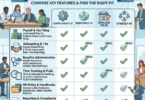
| Time Tracking Software | Best For | Main Strength | Best Business Type |
|---|---|---|---|
| Toggl Track | Simple project tracking | Easy timer, reports, privacy-friendly workflow | Agencies, consultants, remote teams |
| Clockify | Free team tracking | Timesheets, projects, reports, approvals | Small businesses and startups |
| Harvest | Client billing | Time tracking, invoices, project budgets | Agencies and professional services |
| QuickBooks Time | Payroll tracking | GPS, timesheets, payroll integration | QuickBooks users and field teams |
| Hubstaff | Remote monitoring | Screenshots, activity, GPS, payroll | Remote teams and outsourcing |
| Time Doctor | Productivity analytics | Monitoring, attendance, app/website tracking | Remote teams and BPOs |
| TimeCamp | Automatic tracking | Automation, billing, productivity reports | Consultants and agencies |
| Everhour | Project management teams | Time tracking inside work tools | Asana, Trello, Jira, ClickUp teams |
| Timely | Automatic time capture | Memory timeline and automated entries | Knowledge workers and agencies |
| RescueTime | Personal productivity | Focus tracking and distraction insights | Individuals and freelancers |
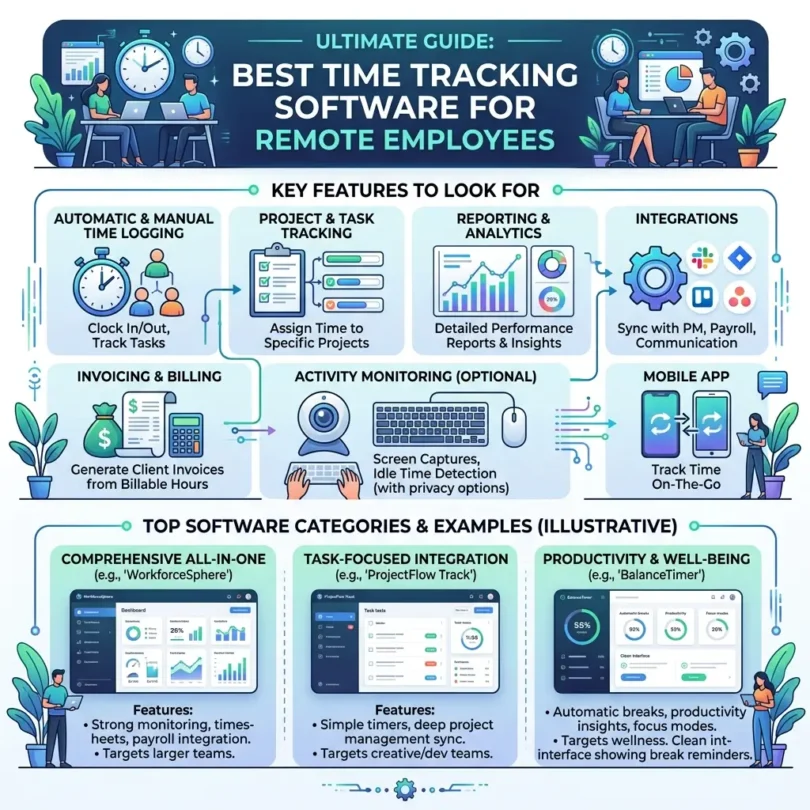
Important Features to Look for in Time Tracking Software
The best time tracking software depends on your team type. A field service business needs different features than a marketing agency or remote software team.
1. Timer and Manual Time Entry
Employees should be able to start a timer or manually add time when needed.
2. Timesheets
Timesheets help organize daily and weekly hours for approval, payroll, and reporting.
3. Project and Task Tracking
Project tracking helps businesses understand how much time goes into each client, project, task, or department.
4. Billable Hours
Agencies and consultants need clear billable and non-billable time tracking.
5. Reports
Reports should show hours by employee, project, client, task, date range, and billable status.
6. Payroll Integration
Hourly employees need accurate payroll data. Tools like QuickBooks Time are especially useful when payroll integration matters.
7. Invoicing
Client service businesses should look for invoicing features or integrations with accounting tools.
8. Approvals
Managers should be able to review and approve timesheets before payroll or invoicing.
9. GPS Tracking
GPS tracking is useful for field teams, construction, delivery, home services, and mobile workers.
10. Employee Privacy Controls
Remote teams should understand what is tracked, what is private, and how data is used.
11. Integrations
Time tracking software should connect with project management, payroll, accounting, CRM, and HR tools.
12. Mobile Apps
Remote and field employees need mobile apps to track time from anywhere.
Time Tracking Software vs Employee Monitoring Software
Time tracking and employee monitoring are related, but they are not the same.
Time Tracking Software
Time tracking focuses on:
- Work hours
- Timesheets
- Project time
- Billable hours
- Payroll hours
- Client reports
- Project budgets
Employee Monitoring Software
Employee monitoring may include:
- Screenshots
- App usage
- Website usage
- Activity levels
- Keyboard and mouse activity
- Location tracking
- Productivity scoring
Some tools include both. For example, Hubstaff and Time Doctor are more monitoring-focused, while Toggl Track and Harvest are more project/time-reporting focused.
For remote teams, choose carefully. Too much monitoring can damage trust. The best approach is transparent, fair, and business-relevant.
Best Time Tracking Software by Business Type
Best for Small Businesses
Clockify, Toggl Track, Harvest, QuickBooks Time, and OnTheClock-style time clock tools are strong options.
Best for Agencies
Harvest, Toggl Track, Everhour, and TimeCamp are strong because they support client billing and project reporting.
Best for Remote Teams
Toggl Track, Clockify, Hubstaff, Time Doctor, and TimeCamp are strong depending on whether you need monitoring or simple time tracking.
Best for QuickBooks Users
QuickBooks Time is the strongest option because it connects time tracking with payroll and accounting.
Best for Field Teams
QuickBooks Time, Hubstaff, and GPS-enabled time clock tools are better for field employees.
Best for Freelancers
Toggl Track, Harvest, Clockify, TMetric, and RescueTime are good options.
Best for Project Management Teams
Everhour, Toggl Track, Clockify, and Harvest are good options depending on the tools you already use.
How Much Does Time Tracking Software Cost?
Time tracking software pricing depends on:
- Number of users
- Free vs paid plan
- Payroll features
- GPS tracking
- Screenshots
- Productivity monitoring
- Project budgeting
- Invoicing
- Time approvals
- Reporting depth
- Integrations
- Mobile apps
- Support level
Some tools offer free plans. Clockify is known for a free time tracking option, while Toggl Track offers free and paid plans. Toggl’s pricing page lists paid plans such as Starter and Premium with per-user pricing, but pricing can change, so always verify directly before buying.
When comparing pricing, ask:
- Is there a free plan?
- Is pricing per user?
- Are reports included?
- Are approvals included?
- Is invoicing included?
- Is GPS included?
- Are screenshots included?
- Is payroll integration included?
- Are project budgets included?
- Are integrations included?
- Is support included?
The cheapest tool is not always the best. Choose the one that matches your workflow.
Time Tracking Best Practices for Remote Teams
Be Transparent
Employees should know what is tracked and why.
Track Projects, Not Just Hours
Project-level time tracking gives better business insights than simple clock-in/clock-out data.
Avoid Over-Monitoring
Use monitoring features only when there is a clear business reason.
Set Clear Expectations
Remote employees should know working hours, deadlines, response times, and reporting requirements.
Use Approvals
Managers should approve timesheets before payroll or invoicing.
Review Reports Weekly
Time reports help identify project delays, budget issues, and workload imbalance.
Connect Time Tracking With Payroll
If employees are hourly, connect approved timesheets with payroll to reduce errors.
Respect Privacy
Privacy-friendly time tracking builds more trust than hidden monitoring.
Train Employees
Show employees how to track time correctly by project, task, and client.
Use Data to Improve Planning
Do not use time tracking only to judge employees. Use it to improve estimates, pricing, staffing, and project planning.
Common Time Tracking Mistakes
Mistake 1: Using Spreadsheets for Too Long
Spreadsheets are easy at first, but they become messy as teams grow.
Mistake 2: Not Tracking Non-Billable Time
Non-billable work affects profitability. Track admin, meetings, revisions, internal work, and training.
Mistake 3: Forgetting Approvals
Unapproved timesheets can create payroll and billing errors.
Mistake 4: Choosing Monitoring When You Only Need Timesheets
Not every business needs screenshots or activity tracking. Simple time tracking may be enough.
Mistake 5: Not Explaining the Purpose
Employees may resist time tracking if they think it is only for surveillance.
Mistake 6: Not Connecting Time With Projects
Tracking hours without project context gives limited insight.
Mistake 7: Ignoring Reports
Time tracking data is valuable only when managers review and use it.
Mistake 8: No Clear Policy
Create a simple policy explaining tracking rules, approvals, corrections, privacy, and expectations.
Final Verdict: What Is the Best Time Tracking Software?
The best time tracking software depends on your business needs.
For most remote teams:
- Best overall simple time tracking: Toggl Track
- Best free time tracking: Clockify
- Best for client billing: Harvest
- Best for QuickBooks payroll users: QuickBooks Time
- Best for remote monitoring: Hubstaff
- Best for productivity analytics: Time Doctor
- Best for automatic tracking: TimeCamp
- Best for project management integrations: Everhour
- Best automatic time capture: Timely
- Best personal productivity tracking: RescueTime
If you want simple project time tracking, start with Toggl Track or Clockify. If you bill clients, compare Harvest, Toggl Track, and Everhour. If payroll and GPS matter, compare QuickBooks Time and Hubstaff. If productivity monitoring matters, compare Time Doctor and Hubstaff.
The most important point is this: time tracking should improve clarity, payroll accuracy, project profitability, and remote team planning. It should not create fear or unnecessary surveillance. The best tool is the one your team can use consistently and honestly.
FAQs About Time Tracking Software
What is the best time tracking software for remote employees?
The best time tracking software depends on your needs. Toggl Track is great for simple project tracking, Clockify is strong for free team time tracking, Harvest is best for client billing, QuickBooks Time is strong for payroll and GPS, and Hubstaff or Time Doctor are better for monitoring.
Is time tracking software useful for remote teams?
Yes. Time tracking software helps remote teams record work hours, manage projects, prepare payroll, bill clients, approve timesheets, and understand workload distribution.
What is the best free time tracking software?
Clockify is one of the strongest free time tracking options for teams. It supports tracking work hours across projects and includes timesheets, reports, and team features.
Is Toggl Track good for remote employees?
Yes. Toggl Track is good for remote employees because it is simple, flexible, and supports project tracking, reporting, calendar views, integrations, and privacy-friendly automated tracking.
What is the best time tracking software for QuickBooks users?
QuickBooks Time is the best fit for many QuickBooks users because it connects time tracking with payroll and accounting workflows. It also supports GPS tracking and job tracking.
What is the best time tracking software for agencies?
Harvest, Toggl Track, Everhour, TimeCamp, and Clockify are strong options for agencies because they support billable hours, project reports, client tracking, and invoicing workflows.
Can time tracking software track employee location?
Some tools can track location if GPS features are enabled. QuickBooks Time and Hubstaff are examples of tools commonly used for GPS-based time tracking.
Is employee time tracking legal?
Rules depend on country, state, and local law. Businesses should be transparent, get required consent where needed, and create a clear time tracking policy.
Does time tracking software help with payroll?
Yes. Time tracking software can help prepare accurate timesheets for payroll, especially for hourly employees, overtime, field workers, and remote teams.
What is the difference between time tracking and employee monitoring?
Time tracking records work hours, projects, tasks, and timesheets. Employee monitoring may include screenshots, activity levels, app usage, website tracking, and GPS. Some tools include both.